Get more from The Independent: How to add The Independent to Google’s preferred sources wherever you are
Now there’s a way to ensure you don’t miss any of The Independent’s stories
With Google’s new feature, you can choose your favorite news outlets to follow — and we know The Independent is one of them.
The search engine’s “Preferred Sources” feature allows you to customize Google’s Top Stories to fit your news preferences. Selecting The Independent as one of your preferred sources ensures you’ll see our articles more prominently.
The feature had initially launched in a limited trial in the US and India. But it is now available in the UK and the rest of the world – ensuring that everyone can follow along with the latest news wherever they are.
That way, you can be sure to keep up with the latest stories from our breaking news coverage, political analysis, crime, culture and lifestyle that you won’t want to miss.
To add The Independent as one of your preferred sources, here’s a shortcut. Alternatively, follow these five easy steps:
- Search any topic that’s in the news.
- Click on the icon to the right of “Top Stories.”
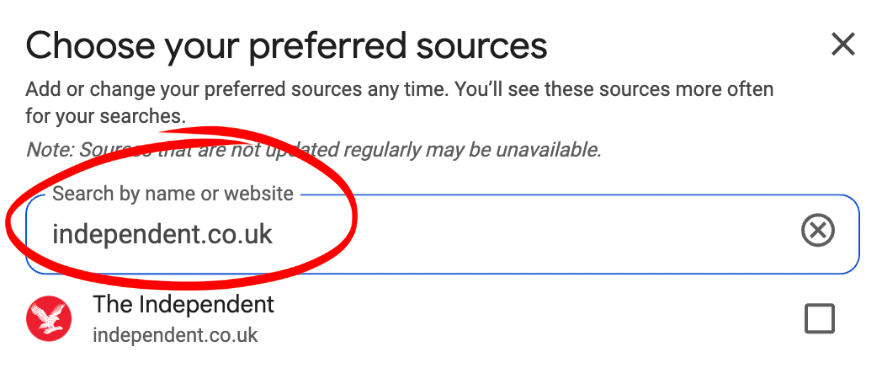
- Type “The Independent” or “independent.co.uk” in the search bar.
- Check the box to the right of The Independent.
- Refresh your search results and see The Independent’s stories in the Top Stories section.


Now, The Independent will appear more frequently in the “Top stories” and “From your sources” sections on Google.
“When you select your preferred sources, you’ll start to see more of their articles prominently displayed within Top Stories, when those sources have published fresh and relevant content for your search,” Google said in a statement.
You can add multiple preferred sources to best satisfy your news diet. Those selections can be changed at any time.
Join our commenting forum
Join thought-provoking conversations, follow other Independent readers and see their replies
Comments
Bookmark popover
Removed from bookmarks